GitHub Actions: Your Complete Guide from Zero to Hero 🚀
Ever wished you had a robot assistant that could automatically test your code, deploy your apps, and send you notifications all while you grab coffee? That's exactly what GitHub Actions does! Let's dive into this game-changer that's transforming how developers work.
1. What is GitHub Actions and Why Should You Care?
GitHub Actions is like having a super-smart assistant living right in your GitHub repository. Every time you push code, open a pull request, or even on a schedule, this assistant springs into action running tests, building your app, deploying to servers, or pretty much anything you can imagine.
Why it's awesome:
Free for public repos (and generous free tier for private ones)
No separate CI/CD service needed it's built into GitHub
Thousands of pre-made actions from the community
Works with any language or platform
Think of it as IFTTT (If This Then That) for your code: "If someone pushes to main branch, then run tests and deploy to production."
2. Key Terms: Learning the Language
Before we write our first workflow, let's decode the jargon:
Workflow: A complete automation process (like a recipe)
Job: A set of steps that run on the same machine (like a chapter in your recipe)
Step: A single task (like "crack two eggs")
Runner: The virtual machine that executes your jobs (your kitchen)
Action: A reusable piece of code someone else wrote (like a pre-made sauce mix)
These pieces fit together like LEGO blocks to create powerful automations!
3. Your First "Hello World" Workflow
Let's start with the simplest possible workflow. Create a file at .github/workflows/hello-world.yml:
name: Hello World Workflow

on:
  push:
    branches: [ main ]
  pull_request:
    branches: [ main ]

jobs:
  say-hello:
    runs-on: ubuntu-latest

    steps:
      - name: Print greeting
        run: echo "Hello, GitHub Actions! 👋"

      - name: Show current date
        run: date

      - name: Display system info
        run: |
          echo "Runner OS: $RUNNER_OS"
          echo "Job status: ${{ job.status }}"
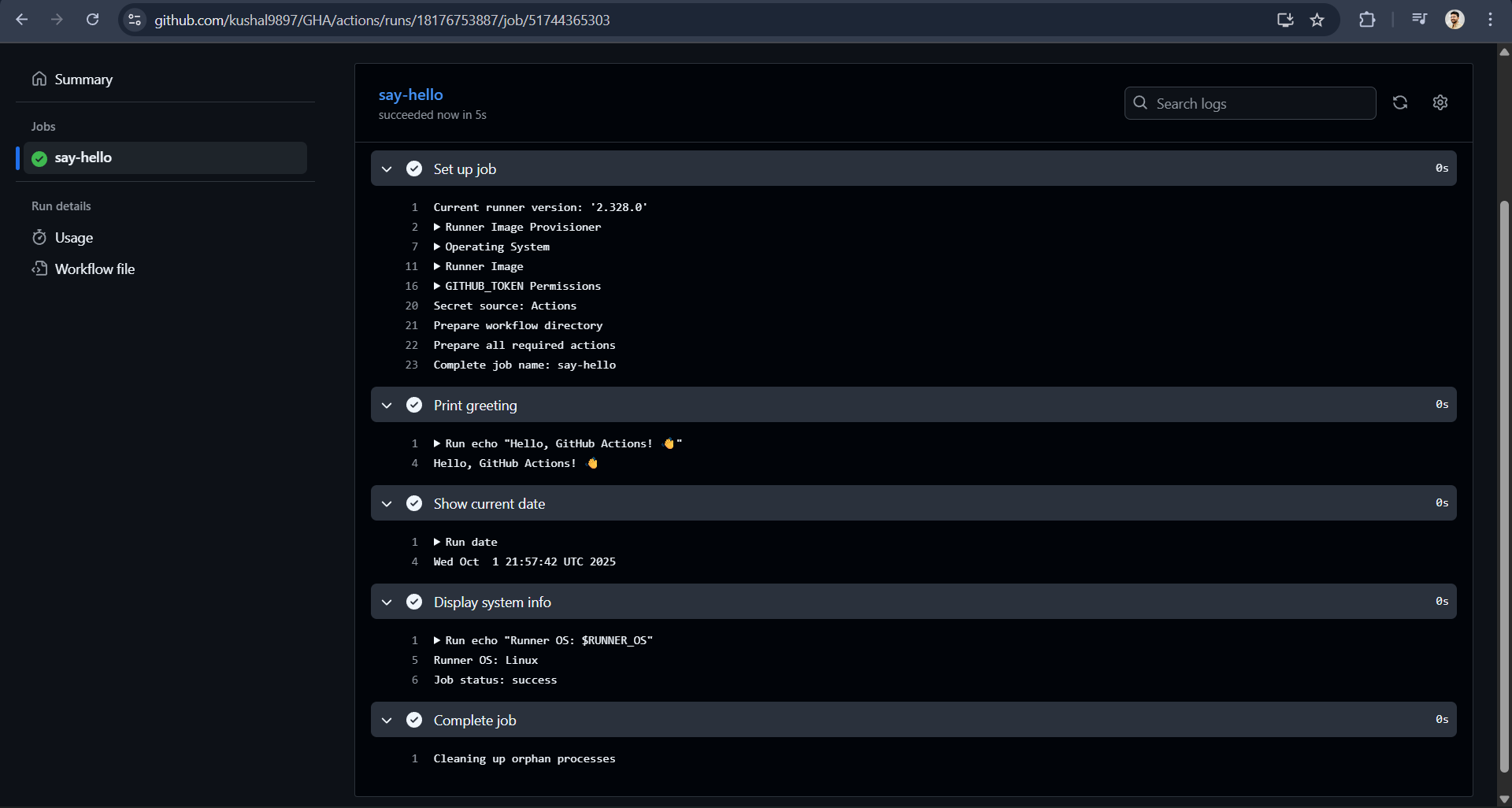
What this does: Every time you push to main or create a PR, this workflow runs on an Ubuntu machine and prints a greeting, the current date, and some system info. The | symbol lets you write multiple commands.
4. Node.js CI with Caching
Now let's build something more practical a workflow that tests your Node.js app and caches dependencies for speed:
name: Node.js CI

on:
  push:
    branches: [ main, develop ]
  pull_request:
    branches: [ main ]

jobs:
  test:
    runs-on: ubuntu-latest

    strategy:
      matrix:
        node-version: [18.x, 20.x]

    steps:
      - name: Checkout code
        uses: actions/checkout@v4

      - name: Setup Node.js ${{ matrix.node-version }}
        uses: actions/setup-node@v4
        with:
          node-version: ${{ matrix.node-version }}

      - name: Cache node modules
        uses: actions/cache@v3
        with:
          path: ~/.npm
          key: ${{ runner.os }}-node-${{ hashFiles('**/package-lock.json') }}
          restore-keys: |
            ${{ runner.os }}-node-

      - name: Install dependencies
        run: npm ci

      - name: Run tests
        run: npm test

      - name: Run linter
        run: npm run lint
What this does: Tests your Node.js app on both Node 18 and 20. It caches your npm packages so future runs are faster if your package-lock.json hasn't changed, it skips re-downloading everything. The npm ci command is faster than npm install for automated environments.
5. Go CI Workflow
Go developers, here's your testing workflow with Go-specific optimizations:
name: Go CI

on:
  push:
    branches: [ main ]
  pull_request:
    branches: [ main ]

jobs:
  test:
    runs-on: ubuntu-latest

    steps:
      - name: Checkout code
        uses: actions/checkout@v4

      - name: Setup Go
        uses: actions/setup-go@v4
        with:
          go-version: '1.21'
          cache: true

      - name: Get dependencies
        run: go mod download

      - name: Run tests
        run: go test -v -race -coverprofile=coverage.out ./...

      - name: Run vet
        run: go vet ./...

      - name: Install golangci-lint
        run: curl -sSfL https://raw.githubusercontent.com/golangci/golangci-lint/master/install.sh | sh -s -- -b $(go env GOPATH)/bin v1.54.2

      - name: Run golangci-lint
        run: golangci-lint run
What this does: Sets up Go 1.21, downloads dependencies, runs tests with race condition detection and coverage reporting, checks for suspicious constructs with go vet, and runs a comprehensive linter. The cache is built into the setup-go action!
6. Matrix Builds: Test Everything, Everywhere
Want to test on Windows, Mac, AND Linux with multiple language versions? Matrix builds are your friend:
name: Cross-platform Matrix Build

on: [push, pull_request]

jobs:
  test:
    strategy:
      matrix:
        os: [ubuntu-latest, windows-latest, macos-latest]
        python-version: ['3.9', '3.10', '3.11']
        exclude:
          - os: windows-latest
            python-version: '3.9'
      fail-fast: false

    runs-on: ${{ matrix.os }}

    steps:
      - uses: actions/checkout@v4

      - name: Set up Python ${{ matrix.python-version }}
        uses: actions/setup-python@v4
        with:
          python-version: ${{ matrix.python-version }}

      - name: Install dependencies
        run: |
          python -m pip install --upgrade pip
          pip install -r requirements.txt

      - name: Run tests
        run: pytest
What this does: Runs your tests on 8 different combinations (3 OS × 3 Python versions, minus Windows+Python 3.9, which we excluded). The fail-fast: false means if one combination fails, the others keep running.
7. Smart Triggers: Path Filters & Skipping Draft PRs
Don't waste CI time on irrelevant changes. Here's how to be selective:
name: Smart CI

on:
  push:
    branches: [ main ]
    paths:
      - 'src/**'
      - 'tests/**'
      - 'package.json'
      - 'package-lock.json'
    paths-ignore:
      - '**.md'
      - 'docs/**'

  pull_request:
    types: [opened, synchronize, reopened, ready_for_review]
    paths:
      - 'src/**'
      - 'tests/**'

jobs:
  test:
    # Skip if PR is draft
    if: github.event.pull_request.draft == false

    runs-on: ubuntu-latest

    steps:
      - uses: actions/checkout@v4

      - name: Run only if code changed
        run: echo "Code files changed, running tests..."

      - name: Run tests
        run: npm test
What this does: Only runs when actual code changes (not documentation). Ignores draft PRs completely. The workflow triggers when a draft PR is marked as "ready for review". Super efficient!
8. Artifacts: Saving and Sharing Files
Need to save test reports, build outputs, or logs? Artifacts are like a temporary cloud storage for your workflow:
name: Build with Artifacts

on: [push]

jobs:
  build:
    runs-on: ubuntu-latest

    steps:
      - uses: actions/checkout@v4

      - name: Build application
        run: |
          mkdir dist
          echo "Built on $(date)" > dist/build-info.txt
          # Your actual build commands here
          npm run build

      - name: Run tests and generate report
        run: |
          npm test -- --coverage
          mv coverage dist/

      - name: Upload build artifacts
        uses: actions/upload-artifact@v3
        with:
          name: build-${{ github.sha }}
          path: dist/
          retention-days: 7

  deploy:
    needs: build
    runs-on: ubuntu-latest

    steps:
      - name: Download build artifacts
        uses: actions/download-artifact@v3
        with:
          name: build-${{ github.sha }}
          path: ./dist

      - name: Display structure
        run: ls -la ./dist

      - name: Deploy to server
        run: echo "Deploying files from ./dist"
What this does: The build job creates files and uploads them as artifacts. The deploy job downloads those same files. Artifacts are kept for 7 days. You can download them from the GitHub Actions UI too!
9. Secrets & Environments: Keeping Sensitive Data Safe
Never put passwords or API keys directly in your workflow! Use secrets instead:
name: Deploy with Secrets

on:
  push:
    branches: [ main ]

jobs:
  deploy-staging:
    runs-on: ubuntu-latest
    environment: staging

    steps:
      - uses: actions/checkout@v4

      - name: Login to server
        env:
          SSH_KEY: ${{ secrets.SSH_PRIVATE_KEY }}
          SERVER_HOST: ${{ secrets.STAGING_HOST }}
        run: |
          mkdir -p ~/.ssh
          echo "$SSH_KEY" > ~/.ssh/id_rsa
          chmod 600 ~/.ssh/id_rsa
          ssh-keyscan -H $SERVER_HOST >> ~/.ssh/known_hosts

      - name: Deploy to staging
        env:
          DATABASE_URL: ${{ secrets.STAGING_DB_URL }}
          API_KEY: ${{ secrets.API_KEY }}
        run: |
          echo "Deploying with secure credentials..."
          # Your deployment commands here

  deploy-production:
    needs: deploy-staging
    runs-on: ubuntu-latest
    environment:
      name: production
      url: https://myapp.com

    steps:
      - uses: actions/checkout@v4

      - name: Deploy to production
        env:
          DATABASE_URL: ${{ secrets.PROD_DB_URL }}
          API_KEY: ${{ secrets.PROD_API_KEY }}
        run: echo "Deploying to production..."
What this does: Uses different secrets for staging and production environments. The production environment can require manual approval. Secrets are masked in logs GitHub automatically hides them!
10. Docker Build & Push to GitHub Container Registry
Build and publish Docker images right from your workflow:
name: Docker Build and Push

on:
  push:
    branches: [ main ]
    tags: [ 'v*' ]

env:
  REGISTRY: ghcr.io
  IMAGE_NAME: ${{ github.repository }}

jobs:
  build-and-push:
    runs-on: ubuntu-latest
    permissions:
      contents: read
      packages: write

    steps:
      - name: Checkout code
        uses: actions/checkout@v4

      - name: Set up Docker Buildx
        uses: docker/setup-buildx-action@v3

      - name: Log in to GitHub Container Registry
        uses: docker/login-action@v3
        with:
          registry: ${{ env.REGISTRY }}
          username: ${{ github.actor }}
          password: ${{ secrets.GITHUB_TOKEN }}

      - name: Extract metadata
        id: meta
        uses: docker/metadata-action@v5
        with:
          images: ${{ env.REGISTRY }}/${{ env.IMAGE_NAME }}
          tags: |
            type=ref,event=branch
            type=ref,event=pr
            type=semver,pattern={{version}}
            type=semver,pattern={{major}}.{{minor}}
            type=raw,value=latest,enable={{is_default_branch}}

      - name: Build and push Docker image
        uses: docker/build-push-action@v5
        with:
          context: .
          push: true
          tags: ${{ steps.meta.outputs.tags }}
          labels: ${{ steps.meta.outputs.labels }}
          cache-from: type=gha
          cache-to: type=gha,mode=max
What this does: Builds your Docker image and pushes it to GitHub's free container registry (ghcr.io). It automatically tags images based on branches and version tags. The GITHUB_TOKEN is automatically provided no setup needed!
11. Reusable Workflows: Write Once, Use Everywhere
Don't repeat yourself! Create a reusable workflow:
File: .github/workflows/reusable-tests.yml
name: Reusable Test Workflow

on:
  workflow_call:
    inputs:
      node-version:
        required: false
        type: string
        default: '20.x'
      environment:
        required: false
        type: string
        default: 'development'
    secrets:
      npm-token:
        required: false

jobs:
  test:
    runs-on: ubuntu-latest

    steps:
      - uses: actions/checkout@v4

      - name: Setup Node.js
        uses: actions/setup-node@v4
        with:
          node-version: ${{ inputs.node-version }}

      - name: Configure npm
        if: ${{ secrets.npm-token != '' }}
        run: echo "//registry.npmjs.org/:_authToken=${{ secrets.npm-token }}" > ~/.npmrc

      - name: Install dependencies
        run: npm ci

      - name: Run tests
        env:
          NODE_ENV: ${{ inputs.environment }}
        run: npm test
Now use it in another workflow:
name: CI Pipeline

on: [push, pull_request]

jobs:
  test-dev:
    uses: ./.github/workflows/reusable-tests.yml
    with:
      node-version: '18.x'
      environment: 'development'

  test-prod:
    uses: ./.github/workflows/reusable-tests.yml
    with:
      node-version: '20.x'
      environment: 'production'
    secrets:
      npm-token: ${{ secrets.NPM_TOKEN }}
What this does: The reusable workflow is like a function you can call with different parameters. Perfect for standardizing CI across multiple repos!
12. Concurrency: Cancel Old Runs
Stop wasting time on outdated runs when you push new commits:
name: CI with Concurrency Control

on:
  push:
    branches: [ main, develop ]
  pull_request:
    types: [opened, synchronize, reopened]

concurrency:
  group: ${{ github.workflow }}-${{ github.event.pull_request.number || github.ref }}
  cancel-in-progress: true

jobs:
  test:
    runs-on: ubuntu-latest

    steps:
      - uses: actions/checkout@v4

      - name: Long running test
        run: |
          echo "Starting tests that take a while..."
          sleep 30
          echo "Tests complete!"
What this does: If you push a new commit while tests are still running, it cancels the old run and starts fresh. The group creates a unique identifier PRs get their own group, branches get another.
13. Manual Triggers with Input
Sometimes you want to run workflows manually with custom parameters:
name: Manual Deployment

on:
  workflow_dispatch:
    inputs:
      environment:
        description: 'Environment to deploy to'
        required: true
        default: 'staging'
        type: choice
        options:
          - development
          - staging
          - production
      version:
        description: 'Version to deploy'
        required: true
        default: 'latest'
        type: string
      enable-debug:
        description: 'Enable debug mode'
        required: false
        type: boolean
        default: false

jobs:
  deploy:
    runs-on: ubuntu-latest

    steps:
      - uses: actions/checkout@v4

      - name: Display inputs
        run: |
          echo "Deploying to: ${{ github.event.inputs.environment }}"
          echo "Version: ${{ github.event.inputs.version }}"
          echo "Debug mode: ${{ github.event.inputs.enable-debug }}"

      - name: Validate production deployment
        if: github.event.inputs.environment == 'production'
        run: |
          echo "⚠️ Production deployment requested!"
          echo "Additional validation checks here..."

      - name: Deploy application
        env:
          DEBUG: ${{ github.event.inputs.enable-debug }}
        run: |
          echo "Deploying version ${{ github.event.inputs.version }} to ${{ github.event.inputs.environment }}"
          # Your actual deployment commands
What this does: Adds a "Run workflow" button in GitHub Actions tab where you can choose environment, specify version, and toggle debug mode. Perfect for manual deployments or admin tasks!
14. Slack Notifications
Keep your team in the loop with Slack notifications:
name: Build with Slack Notifications

on:
  push:
    branches: [ main ]

jobs:
  build:
    runs-on: ubuntu-latest

    steps:
      - uses: actions/checkout@v4

      - name: Build application
        id: build
        run: |
          echo "Building application..."
          # Your build commands here
          echo "build-version=v1.0.${{ github.run_number }}" >> $GITHUB_OUTPUT

      - name: Run tests
        run: npm test

      - name: Notify Slack on Success
        if: success()
        uses: slackapi/slack-github-action@v1.24.0
        with:
          payload: |
            {
              "text": "Build Successful!",
              "blocks": [
                {
                  "type": "section",
                  "text": {
                    "type": "mrkdwn",
                    "text": "*Build Successful* \n*Version:* ${{ steps.build.outputs.build-version }}\n*Branch:* ${{ github.ref_name }}\n*Commit:* ${{ github.sha }}\n*Author:* ${{ github.actor }}"
                  }
                }
              ]
            }
        env:
          SLACK_WEBHOOK_URL: ${{ secrets.SLACK_WEBHOOK_URL }}

      - name: Notify Slack on Failure
        if: failure()
        uses: slackapi/slack-github-action@v1.24.0
        with:
          payload: |
            {
              "text": "❌ Build Failed!",
              "blocks": [
                {
                  "type": "section",
                  "text": {
                    "type": "mrkdwn",
                    "text": "*Build Failed* \n*Branch:* ${{ github.ref_name }}\n*Commit:* ${{ github.sha }}\n*Author:* ${{ github.actor }}\n<${{ github.server_url }}/${{ github.repository }}/actions/runs/${{ github.run_id }}|View Logs>"
                  }
                }
              ]
            }
        env:
          SLACK_WEBHOOK_URL: ${{ secrets.SLACK_WEBHOOK_URL }}
What this does: Sends formatted Slack messages when builds succeed or fail. Includes links directly to the logs. You'll need to set up a Slack webhook URL and add it as a secret.
15. Troubleshooting Tips
Here are the most common errors and how to fix them in plain English:
Error: "Permission denied"
# Fix: Add permissions to your job
jobs:
  build:
    runs-on: ubuntu-latest
    permissions:
      contents: read
      packages: write
      pull-requests: write
Error: "No such file or directory"
# Fix: Always checkout code first!
steps:
  - uses: actions/checkout@v4  # Do this FIRST
  - run: cat package.json       # Now files exist
Error: "Process completed with exit code 1"
# Fix: Add error handling
steps:
  - name: Might fail
    continue-on-error: true
    run: npm test

  - name: Always runs
    if: always()
    run: echo "Cleanup here"
Debugging: See what's happening
steps:
  - name: Debug environment
    run: |
      echo "Current directory: $(pwd)"
      echo "Files here:"
      ls -la
      echo "Environment variables:"
      env | sort
      echo "GitHub context:"
      echo '${{ toJSON(github) }}'
Secret not working?
# Common mistakes:
#  Wrong: ${{ secret.MY_SECRET }}
#  Right: ${{ secrets.MY_SECRET }}

#  Wrong: Using secret in if condition
# if: ${{ secrets.MY_SECRET == 'value' }}

# Right: Secrets can't be used in conditions
# Instead, use them in env or run
16. Complete CI/CD Pipeline: From Code to Production
Here's a real-world pipeline that does everything:
name: Complete CI/CD Pipeline

on:
  push:
    branches: [ main, develop ]
  pull_request:
    branches: [ main ]

env:
  REGISTRY: ghcr.io
  IMAGE_NAME: ${{ github.repository }}

jobs:
  # Job 1: Run tests
  test:
    runs-on: ubuntu-latest
    strategy:
      matrix:
        node-version: [18.x, 20.x]

    steps:
      - uses: actions/checkout@v4

      - name: Setup Node.js ${{ matrix.node-version }}
        uses: actions/setup-node@v4
        with:
          node-version: ${{ matrix.node-version }}
          cache: 'npm'

      - run: npm ci
      - run: npm test
      - run: npm run lint

  # Job 2: Build Docker image
  build-docker:
    needs: test
    runs-on: ubuntu-latest
    permissions:
      contents: read
      packages: write
    outputs:
      image-tag: ${{ steps.meta.outputs.tags }}

    steps:
      - uses: actions/checkout@v4

      - name: Set up Docker Buildx
        uses: docker/setup-buildx-action@v3

      - name: Log in to Registry
        uses: docker/login-action@v3
        with:
          registry: ${{ env.REGISTRY }}
          username: ${{ github.actor }}
          password: ${{ secrets.GITHUB_TOKEN }}

      - name: Extract metadata
        id: meta
        uses: docker/metadata-action@v5
        with:
          images: ${{ env.REGISTRY }}/${{ env.IMAGE_NAME }}
          tags: |
            type=sha,prefix={{branch}}-

      - name: Build and push
        uses: docker/build-push-action@v5
        with:
          context: .
          push: true
          tags: ${{ steps.meta.outputs.tags }}
          cache-from: type=gha
          cache-to: type=gha,mode=max

  # Job 3: Deploy to staging
  deploy-staging:
    needs: build-docker
    if: github.ref == 'refs/heads/develop'
    runs-on: ubuntu-latest
    environment: staging

    steps:
      - name: Deploy to Staging
        env:
          IMAGE_TAG: ${{ needs.build-docker.outputs.image-tag }}
        run: |
          echo "Deploying $IMAGE_TAG to staging..."
          # SSH to server, pull image, restart service
          # kubectl set image deployment/app app=$IMAGE_TAG

  # Job 4: Deploy to production
  deploy-production:
    needs: build-docker
    if: github.ref == 'refs/heads/main'
    runs-on: ubuntu-latest
    environment:
      name: production
      url: https://myapp.com

    steps:
      - name: Deploy to Production
        env:
          IMAGE_TAG: ${{ needs.build-docker.outputs.image-tag }}
        run: |
          echo "Deploying $IMAGE_TAG to production..."
          # Your production deployment commands

      - name: Notify team
        if: always()
        uses: slackapi/slack-github-action@v1.24.0
        with:
          payload: |
            {
              "text": "${{ job.status == 'success' && ' Deployed to production!' || ' Production deployment failed!' }}"
            }
        env:
          SLACK_WEBHOOK_URL: ${{ secrets.SLACK_WEBHOOK_URL }}
What this does: A complete pipeline that tests code, builds a Docker image, deploys to staging (from develop branch), and deploys to production (from main branch) with environment protections and Slack notifications.
17. Quick Glossary
CI/CD: Continuous Integration/Continuous Deployment (automating tests and deployments)
Runner: The computer that runs your jobs (GitHub provides free ones)
Workflow: Your entire automation (the YAML file)
Job: A section that runs on one runner
Step: Individual commands within a job
Action: Pre-made code you can use (from GitHub Marketplace)
Artifact: Files saved from one job to use in another
Matrix: Running the same job with different configurations
Secret: Encrypted variables for sensitive data
Environment: Settings and secrets for specific deployment targets
18. Next Steps
You're now equipped with GitHub Actions superpowers! Here's what to do next:
Start small: Add a simple test workflow to your project
Browse the Marketplace: Check out github.com/marketplace for pre-made actions
Study examples: Look at
.github/workflowsfolders in popular open-source projectsEnable security features: Use Dependabot and CodeQL actions for security scanning
Monitor usage: Check Settings → Actions to see your minute usage
Join the community: Follow #GitHubActions on Twitter/X for tips and tricks
Cheat Sheet: Copy-Paste YAML Snippets
Here are the most useful snippets all in one place:
Basic Triggers
# On push to specific branches
on:
  push:
    branches: [ main, develop ]

# On PR
on:
  pull_request:
    branches: [ main ]

# On schedule (cron)
on:
  schedule:
    - cron: '0 0 * * 0'  # Weekly on Sunday

# Manual trigger
on:
  workflow_dispatch:

# Multiple triggers
on: [push, pull_request, workflow_dispatch]
Common Steps
# Checkout code
- uses: actions/checkout@v4

# Setup Node.js
- uses: actions/setup-node@v4
  with:
    node-version: '20'
    cache: 'npm'

# Setup Python
- uses: actions/setup-python@v4
  with:
    python-version: '3.11'

# Cache dependencies
- uses: actions/cache@v3
  with:
    path: ~/.npm
    key: ${{ runner.os }}-node-${{ hashFiles('**/package-lock.json') }}

# Upload artifact
- uses: actions/upload-artifact@v3
  with:
    name: my-artifact
    path: dist/

# Download artifact
- uses: actions/download-artifact@v3
  with:
    name: my-artifact
Conditional Execution
# Only on main branch
if: github.ref == 'refs/heads/main'

# Only on PR
if: github.event_name == 'pull_request'

# On success/failure
if: success()
if: failure()
if: always()

# Skip draft PRs
if: github.event.pull_request.draft == false
Useful Variables
# Current branch
${{ github.ref_name }}

# Commit SHA
${{ github.sha }}

# PR number
${{ github.event.pull_request.number }}

# Actor (who triggered)
${{ github.actor }}

# Repository
${{ github.repository }}

# Run number
${{ github.run_number }}
Remember: The best way to learn is by doing. Start with a simple workflow, then gradually add complexity. GitHub Actions is incredibly powerful, but you don't need to use every feature right away.
Happy automating! 🎉
About the author
An enthusiastic Computer Science student who loves to read to enhance learning, gain a deeper understanding of coding, and work towards becoming a skilled DevOps engineer or a proficient Developer Relations professional. I also enjoy writing blogs to share what I learn and document new insights.
Comments
Join the discussionNo comments yet. Be the first to comment.
